Quick Start: How to start an escrow in 1 minute on Telegram
Starting an escrow with TriSig on Telegram takes only three steps: find the bot, launch and connect your wallet, and create your first order. The whole process takes about 1 minute.
Step 1: Find the Bot
Type @TriSig_io_bot in the search box at the top of Telegram, or directly open the official link t.me/TriSig_io_bot. Look for the verified account in the search results and click to enter the chat.
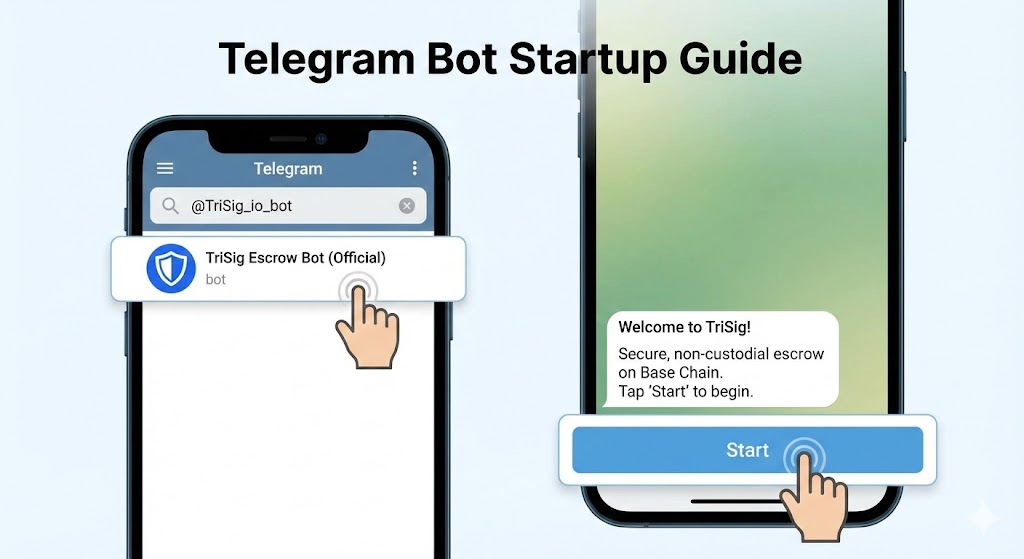
*Image: Search for @TriSig_io_bot on Telegram*
Step 2: Launch and Connect
- In the chat with @TriSig_io_bot, click Start or send /start to initiate the bot.
- Click "Open Mini App" or "Start Escrow" in the chat or menu to enter the TriSig Mini App page.
- Select "Connect Wallet" in the Mini App, follow the prompts to connect using WalletConnect or TON Connect, and confirm the current network is Base Chain (Chain ID: 8453).
Step 3: Create Your First Order
- If you are the Seller (Receiver): Click "Create Escrow" in the Mini App, fill in the amount (USDT), the buyer's Telegram username, and order description. After confirming the contract address, send the escrow link to the buyer and wait for them to pay into the contract.
- If you are the Buyer (Payer): Click the escrow link sent by the seller, verify the amount and receiver, then click "Go to Pay". Transfer USDT (Base Chain) to the contract address in your wallet to lock the funds. After the seller delivers, click "Confirm Receipt" in the Mini App, and the contract will automatically release the USDT to the seller.
By completing these three steps, you have started the TriSig escrow process. Subsequent steps only involve delivery and confirmation according to the order agreement.
Try it on Telegram
Open @TriSig_io_bot in Telegram and follow the steps above to start your first escrow within 1 minute.